OctoEverywhere
Free, secure remote access and AI failure detection for almost any 3D printer. A community project for keeping an eye on prints, wherever life takes you.
Facts
| Created | Status | Code | Community |
|---|---|---|---|
| 2020 | Active | GitHub | 500k+ makers |
The story
I started OctoEverywhere so anyone could check an OctoPrint printer remotely, safely, and for free. I invited alpha testers on August 5, 2020, and opened the public beta in November. It now works with almost any 3D printer, including OctoPrint, Klipper, Bambu Lab, Elegoo, Prusa, Creality, Anycubic, and Snapmaker.
The goal is still the same: empower the whole maker community. Optional Supporter Perks provide 100% of the funding, which keeps the core features free and unlimited, and as support grows, the free limits go up for everyone. Today, more than 500,000 makers use OctoEverywhere, and it has a 4.9 out of 5 rating on Trustpilot. Every day, Gadget checks over 5 million webcam images, and the notification engine sends more than 375,000 notifications.
The timeline · 2020–2026
Timeline
| Year | Milestones |
|---|---|
| 2020 | First public alpha announcement on August 5; public beta launches for OctoPrint in November |
| 2021 | v1 protocol; seven data center regions; Printoid, OctoPod, and Polymer app support; new dashboard; qLabs LLC; Discord community; real-time notifications |
| 2022 | Live Links; email login verification; Slipstream; SMS and desktop notifications; Intelligent Server Selection; Quick View; Gadget beta |
| 2023 | Klipper support; iPhone push notifications; Klipper Companion |
| 2024 | Bambu Connect for Bambu Lab printers; Zstandard compression |
| 2025 | Elegoo Connect; MCP server for 3D printing; Windows Plugin Manager |
| 2026 | Passkeys; PrusaLink support; Bambuddy remote access |
Remote access, printers & setup
Remote Access
Full Remote Access
Free, unlimited remote access opens the printer's complete web interface: OctoPrint, Mainsail, Fluidd, or Bambu Lab. Plugins, webcams, file transfers, and controls work as they do at home, without port forwarding, a VPN, or exposing the printer to the public internet.
Worldwide Server Mesh
A global server mesh finds the best data center for each printer, opens connections worldwide to find the shortest path, and routes around outages. By mid-2021, it covered seven regions across North America, Europe, and Asia. In 2022, Intelligent Server Selection began measuring live latency to choose the fastest servers. The average portal got 10–30% faster, and nearly a quarter of users saw improvements of 70% or more.
Slipstream
Released in 2022, Slipstream caches and optimizes traffic across the web portal, plugin, and server network. It made OctoPrint portals load 2.2 to 3.1 times faster, sometimes beating a direct connection on the home network.
Protocol & Compression
I rewrote the plugin-to-server protocol in 2021 for faster page loads, smoother webcams, and lower data use. WebSocket compression for browsers and apps followed, along with IPv6 across the whole service. In 2024, Zstandard compression with pre-computed dictionaries made compression up to 60% faster and 40–300% more efficient than the previous gzip setup.
Shared Connections
Shared Connections are secure, unique printer links, and you decide when they expire. Share one with a friend or use it in place of a local printer address, such as in the OctoPrint plugin for Cura.
Spoolman, OctoFarm & Bambuddy
Remote access also supports Spoolman for filament tracking, OctoFarm for print farms, and, since 2026, Bambuddy for Bambu Lab printers.
Printer Support
OctoPrint
The original plugin installs through OctoPrint's plugin manager and became one of its top-rated plugins.
Klipper
Klipper support arrived in 2023 for Moonraker, Mainsail, and Fluidd, with remote access, AI failure detection, notifications, and app support. Setup guides followed for the Creality K1 and Sonic Pad, plus Klipper printers from Sovol, Elegoo, QIDI, Anycubic, FlashForge, and Snapmaker.
Klipper Companion
Released in 2023, Klipper Companion connects over the local network from a separate device, such as a $15 Raspberry Pi Zero 2 W. It works around printers that are locked down, lack SSH access, or can't spare the resources to run a plugin.
Bambu Connect
In 2024, Bambu Connect brought every Bambu Lab printer on board, working alongside Bambu's own software. It brought AI failure detection to A1 and P1 cameras, raised streaming from one frame per second to 15 FPS, and added external webcams at full frame rate.
Elegoo Connect & PrusaLink
Networked plugins came to the Elegoo Centauri Carbon in 2025, followed by the Centauri Carbon 2 and, in 2026, PrusaLink printers.
Docker & Windows Plugin Manager
Networked plugins run through a Linux command line installer, Docker, or the OctoEverywhere Plugin Manager. Released on the Windows Store in 2025, the manager installs, runs, and automatically updates a plugin for each printer.
Gadget, alerts & live monitoring
AI Failure Detection
Gadget
Gadget is a free, unlimited AI that watches your prints for spaghetti, bed adhesion problems, layer issues, and other failures. When it spots trouble on the webcam, it alerts you or pauses the print to save time and filament. Image classification identifies problems, while a temporal model follows how the print develops over time. Supporters can use advanced detection models.
Thousands of makers signed up when I announced Gadget in August 2022. About 300 early testers helped reshape major parts of it. Even in beta, it checked more than 3 million images a day and caught failures with about 95% accuracy. Quite a lot of staring at printers.
Gadget API
The Gadget API supports print farm software, personal projects, and white-label products. Every account includes 500 free print hours of inspections each month.
Notifications & Monitoring
Real-Time Print Notifications
The notification engine launched in 2021 with alerts for more than ten events: completed or failed prints, progress, first layers, filament changes, required user interaction, and more. Each message is tailored to its platform and usually includes a full-resolution webcam snapshot. Destinations include email, SMS, Discord, Telegram, Slack, Pushover, and Pushbullet.
Desktop & Mobile Push
Browser push brings the same rich alerts to Windows, Mac, and Android without an app. iPhone and iPad support followed in 2023.
Webhooks
Every notification event can go to a custom HTTP endpoint, so you can hook it into your own automations.
Multi-Printer Dashboard
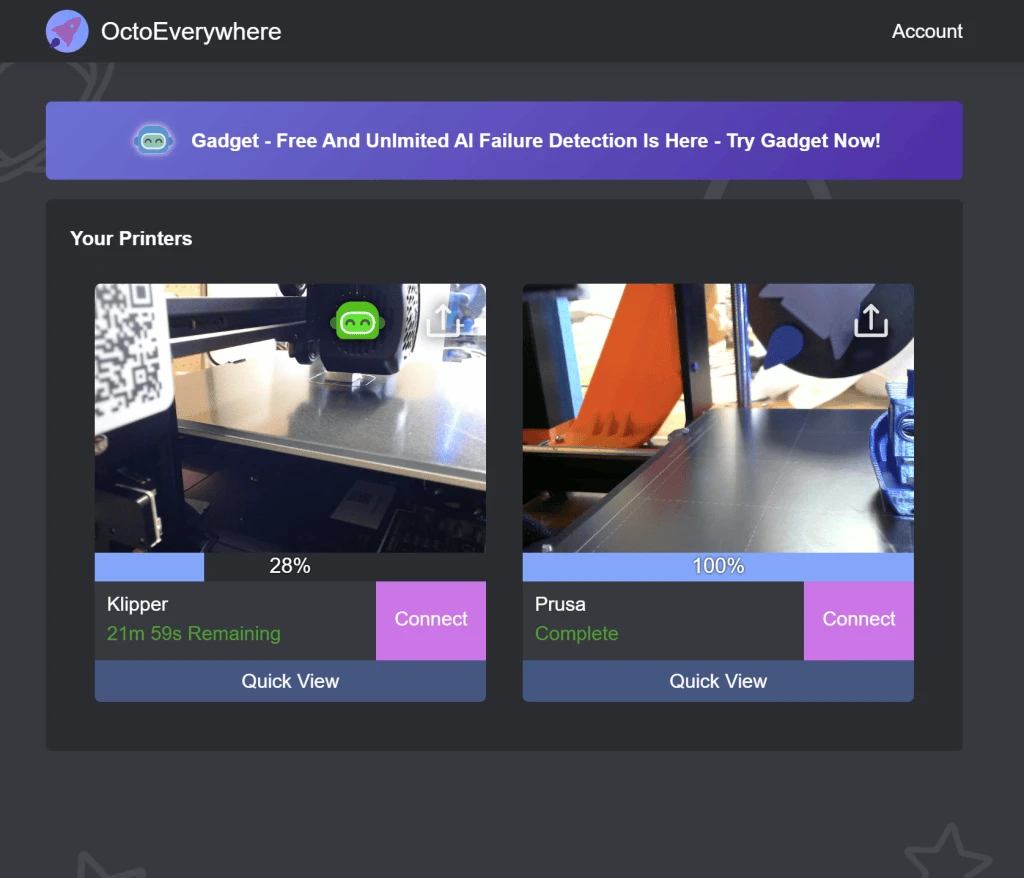
The 2021 dashboard redesign put webcam snapshots and status for every printer in one view, handy for print farms.
Quick View
Quick View arrived in 2022 with a live webcam, print progress, time remaining, and Gadget's latest assessment. This fast status page also introduced OctoEverywhere's first direct pause and cancel controls.
Live Links
Live Links launched in 2022: free public streams with a webcam, live printer stats, and model links. They show rich previews on social platforms, and creators can add their social accounts to every link.
Webcam Streaming
Free webcam streaming supports multiple cameras at full resolution and frame rate, up to 30 FPS. Plugin improvements keep reducing startup time and smoothing playback, especially on low-powered devices.
Apps, AI & developer tools
Apps, AI & Developer Tools
Mobile App Integrations
App partnerships bring secure remote access with one sign-in. Printoid for Android came first in 2021, followed by OctoPod and Polymer for iPhone. OctoApp, Mobileraker, and Printer Tools are now supported too.
Installable Web App
The website also installs as a lightweight app on iPhone, Android, and desktop.
MCP Server For 3D Printing
Launched in June 2025 as the first cloud-based MCP server for 3D printing, this connects AI assistants such as Claude, ChatGPT, and Gemini to any supported printer. They can check status, view live webcam snapshots, and pause, resume, or cancel prints.
Developer APIs
Developers get App Connections, an OAuth-style sign-in flow; printer-agnostic Plugin APIs for status, controls, webcams, and files; direct REST, WebSocket, and MQTT access; and notification webhooks.
Security, privacy & community
Security & Privacy
Encrypted Tunnel
The plugin opens an end-to-end encrypted tunnel to OctoEverywhere without exposing the printer to the public internet. Printer credentials pass through without being stored. Each app connection covers one printer and can be revoked anytime.
Account Protection
Accounts support Google and Apple sign-in, time-based two-factor codes, and, since 2026, passkeys. Since 2022, every account also needs an emailed code when signing in from a new location.
Privacy
OctoEverywhere never sells user data. Printer status, webcam images, and other data stay private to the owner.
Community
Makers help shape OctoEverywhere. The official Discord server opened in 2021 for people to meet, help each other, and share feedback with me. Supporter Perks add advanced AI models, more printers, and larger file transfers. I announce and explain pricing changes in advance, and keep the free tier as generous as the project can afford.
April Fools
On April 1, 2024, we announced Gadget GPT Voice AI: a ChatGPT-powered voice and personality for every printer. Our Bambu X1 Carbon became Charming Charles. An older Ender 3 became Grumpy Gus, who refused to work before 11 a.m. Charles narrated a spaghetti failure in real time; an editor’s note delayed the launch until the AI could "act more humane."
University research & field tests
In Use
OctoEverywhere has also appeared in university research. A 2024 paper from Rzeszów University of Technology describes adding cameras and OctoPrint servers to its Prusa i3 MK3 laboratory, using OctoEverywhere for remote viewing and Gadget for print supervision. The researchers reported no observed negative effect on printing when they tested the plugin on their Raspberry Pi Zero setup. The paper includes photographs of the lab, camera mounts, and printer modifications. Read the paper.
Another 2024 paper, archived by Brunel University, used OctoEverywhere as the printer-control component of a custom cloud monitoring system. Its prototype combined an Ender-3, Raspberry Pi 400, and USB camera with separate Arduino temperature and humidity sensors. Figure 6 shows the cloud interface's printer previews and OctoEverywhere-based control panel; the wider system also collected environmental data for printing experiments. Read the paper.
In 2025, a Brno University of Technology thesis tested the free version against Obico and the author's CVPrinting plugin on an Ender 3 V3 SE. In that specific setup, OctoEverywhere sent Discord alerts within one or two minutes of the simulated spaghetti failures becoming visible. Stringing detection varied with the test and camera angle. It sent no false alerts during the thesis's more than ten hours of successful prints. The methodology and individual results are on printed pages 37–40. Read the thesis.
Press
- All About Bambu (2025) - OctoEverywhere Developer Interview
- The Infill Podcast (2023) - Remote 3D Printing, AI, & More
- Hanselminutes (2022) - 3D Printers Work Everywhere with OctoEverywhere and Quinn Damerell
Articles, videos & source notes
Further Reading & Media
The full reading shelf: articles, recordings, research, and community guides. Dates are publication dates unless noted; some older sources are only intermittently available.
Project Origins
- New Plugin – OctoEverywhere! – Looking For Alpha Testers! — My first public OctoEverywhere post, published as Quinninator on August 5, 2020. The original invitation, version 0.1.0 installation reports, early community feedback, and my explanation of the Python plugin and C# service are still in the thread.
- Looking For Beta Testers – OctoEverywhere access your printer from anywhere for free! — Quinn Damerell, r/octoprint, November 29, 2020. The broader beta invitation, with early users' experiences and discussion of remote access, mobile apps, and community funding.
- OctoEverywhere is celebrating one year of free remote access — Quinn Damerell, r/3Dprinting, November 14, 2021. A retrospective on the original prototype, the community's growth, and the project's founding supporters.
Articles & Reviews
- OctoPrint Guide + Best Plugins — Thomas Sanladerer, July 5, 2021; updated July 13, 2022. Includes a dedicated OctoEverywhere section and an early interface screenshot.
- OctoEverywhere – Dieser Dienst macht OctoPrint am 3D-Drucker weltweit zugänglich — Matthias Petrat, April 5, 2022. German hands-on review with dashboard and mobile screenshots, describing use with three printers.
- CR-6 SE 3D-Drucker von Creality — Matthias Petrat, August 12, 2022. Separate German printer review recommending OctoEverywhere, with photographs of the printer and setup.
- 12 Best OctoPrint Plugins You Can Download — Michael Dwamena, 3D Printerly, August 21, 2022; updated November 13, 2023. OctoEverywhere is the eighth selection, with discussion of remote access, webcams, and alerts.
- OctoPrint for the Seeed Studio reTerminal – Live Blog – Day 2 — Pete Codes, September 6, 2022. Includes an OctoEverywhere section, a period website screenshot, and discussion of a forthcoming community talk.
- OctoEverywhere: Know About the Most Popular OctoPrint Plugin — Manufactur3D, September 22, 2022. Substantial profile with founder quotes, early project history, company-supplied illustrations, and Gadget described during its closed beta. The headline was later updated to include 2023.
- When Should You Turn Off Your Ender 3? After the Print? — Michael Dwamena, 3D Printerly, September 26, 2022; updated November 13, 2023. Includes a brief OctoEverywhere mention in its discussion of remote printer control.
- OctoApp for OctoPrint: All You Need to Know — Sam Rhodes, All3DP, December 15, 2022. Describes OctoEverywhere's app integrations alongside period mobile-app screenshots.
- Remote printer access for Klipper – OctoEverywhere — 3DP and Me, April 5, 2023; updated April 6. Extensive illustrated hands-on review covering setup, Discord notifications, and Gadget; the author explicitly states it is not sponsored.
- Собакокамера для рыбной прошивки. BeaglePrint, Beagle Camera от Mintion — dagov, 3DToday, April 20, 2023. Russian Beagle Camera review with hardware photographs and sample timelapses, briefly comparing its setup with OctoEverywhere. The camera was supplied for review.
- OctoEverywhere Improves Your OctoPrint or Klipper Experience — Cameron Coward, Hackster.io, approximately 2023. Feature on remote access and Gadget; the page displays a relative publication date.
- お家の3Dプリンターをお外で操作しよう!(導入編) — ムー, note.com, August 4, 2023. Japanese setup article, “Operate your home 3D printer from outside,” with VORON, Prusa, KIAUH, and dashboard screenshots.
- OctoEverywhere: Empowering 3D Printing Enthusiasts with Seamless Remote Access — StanleyGatero, Limitless Magazine, August 31, 2023. A promotional-style profile; it doesn't say how it was reported or whether it was sponsored.
- Obico (3D Printing Remote Control): All You Need to Know — Adam Vicknair and Jackson O'Connell, All3DP, October 6, 2023. Includes an OctoEverywhere comparison and company-supplied image; its feature and limit details are from 2023 and may be out of date.
- Bizon 3 и Octoprint — DrProg, 3DToday, November 22, 2023. Russian hands-on OctoPrint setup with printer and Raspberry Pi photographs, including a brief discussion of OctoEverywhere's cloud access without port forwarding. The manufacturer supplied the Raspberry Pi.
- Klipper on Android: All You Need to Know — Datis Reyhani, All3DP, December 25, 2023. Includes an OctoEverywhere subsection and an interface image credited to Quinn Damerell.
- The Best OctoPrint Plug-ins — All3DP, updated January 15, 2024. Dedicated OctoEverywhere entry with a dashboard screenshot credited to Matthias Petrat.
- Installing OctoPrint on a 3D Printer: Step-by-Step Instructions — 3DIY Shop, July 1, 2024. Russian illustrated tutorial with a paragraph recommending OctoEverywhere for remote access.
- Test Caisson et Caméra AI pour imprimante 3D Two Trees SK1 — LesImprimantes3D, July 12, 2024. French illustrated hardware review in which the author installs OctoEverywhere to add failure detection, notifications, and remote stopping.
- Turn Your 3D Printer Into a Smart Machine: How OctoPrint Changes the Game — D. Bryan King, June 6, 2025. Personal OctoPrint article with an OctoEverywhere recommendation.
- Installing Home Assistant with Docker Compose — Mcrane / 09LABS, June 15, 2025. Korean personal account describing an attempt to use OctoEverywhere with a Chinese-market Bambu P1S before pursuing Home Assistant.
- How to Use OctoEverywhere for 3D Printing — Good Prints 3D, June 12, 2026. A general product overview, without much hands-on testing.
- Best OctoPrint Plug-ins: Enhance Your 3D Printing Productivity! — William McCollum, 43DPrint, updated August 18, 2026; original publication date unknown. OctoEverywhere is the third selection, with an image and discussion of remote monitoring.
Talks & Videos
- OctoEverywhere - Access Octoprint from anywhere - Chris's Basement — Chris Riley, March 24, 2021. Early introduction to Quinn Damerell's plugin, with installation and app demonstrations.
- How to setup OctoPrint! (+ best plugin recommendations) — Thomas Sanladerer / Made with Layers, June 25, 2021. Includes OctoEverywhere among the recommended plugins; Elegoo sponsorship is disclosed.
- Remote access to Anycubic Vyper using OctoPrint & OctoEverywhere, Part 1: Security & Tech Essentials — Renaissance Laboratories, September 2, 2021. First installment of an early practical tutorial.
- Remote access to Anycubic Vyper using OctoPrint & OctoEverywhere, Part 2: How-to, Start to Finish — Renaissance Laboratories, September 9, 2021. Setup walkthrough and an off-network test print.
- OctoApp Tutorials: Remote access with OctoEverywhere — Crys' Livingroom Workbench, September 19, 2021. Partner tutorial showing the early browser and OctoApp integration.
- My Favorite Octoprint Plugins // 14 Plug-ins To Get Started — This Smart House, November 4, 2021. An 18-minute plugin roundup including OctoEverywhere.
- OctoEverywhere Revisit - Win a 3D Printer - 2022 - Chris's Basement — Chris Riley, January 26, 2022. Revisits installation and features a year after the first video.
- Controla tu impresora desde cualquier parte del mundo de la mano de OctoEverywhere y Elon Musk XD — Alfa&Omega, February 20, 2022. Spanish remote-access walkthrough.
- Wirelessly Control Your 3d Printer From Anywhere! (OctoEverywhere) — ModBot, March 19, 2022. Setup and feature demonstration.
- Access Your 3D Printer Octoprint ANYWHERE... on ANY DEVICE! — The Next Layer, September 5, 2022. Demonstrates access from watches, TVs, Telegram, desktop tools, and widgets.
- Notts IoT – November 2022 — Peter Gallagher / Notts IoT, streamed November 17 and published November 18, 2022. Recording of Quinn's “Enabling OctoPrint for 3D Printing Everywhere” talk, with presentation slides visible around 12:49. Related material includes the event announcement, published November 1, the Meetup listing, and a speaker portrait.
- 12 MUST-HAVE Octoprint Plugins for Happier 3D Printing — The Next Layer, January 31, 2023. OctoEverywhere segment begins at 4:15; the video explicitly discloses OctoEverywhere sponsorship.
- OctoEverywhere - Klipper - Remote Monitoring - Chris's Basement - 2023 — Chris Riley, April 26, 2023. Klipper setup, remote controls, Gadget, and KIAUH demonstration.
- Octoeverywhere mit einem Klipper Drucker verbinden — Make-o-Rama 3D Druck, June 11, 2023. German guide to connecting a Klipper printer.
- OctoEverywhere Gives Your 3D Printer Failure Detection, Remote Access, Live Streaming and More! — Figure Feedback, March 18, 2024. Demonstrates Gadget, Live Links, Neptune 4 and Raspberry Pi setup, Fluidd, and OctoApp; includes a referral link.
- Octoeverywhere Review and Install — Stacking Layers, March 24, 2024. Review and installation walkthrough; PCBWay sponsorship and an OctoEverywhere referral link are disclosed.
- Bambu Lab X1C über Octoeverywhere steuern? — Make-o-Rama 3D Druck, May 8, 2024. German livestream testing Raspberry Pi-based control of a Bambu Lab X1C.
- Octoeverywhere review on the Creality K1 by 3DPUK TECH CHANNEL — 3DPUK TECH CHANNEL, June 21, 2024. Creality K1 review; PCBWay sponsorship is disclosed.
- OctoEverywhere: Free print failure detection for your Klipper 3D Printer!! — PrintsLeo3D, September 1, 2024. Klipper tutorial with a trial offer arranged with Quinn and PCBWay support.
- OctoEverywhere - You need to install this on your 3D printer — The Printable Watch, November 25, 2024. Short overview and demonstration.
- Turn your 3D Printer SMART - FREE! — Uncle Jessy, March 22, 2025. Elegoo Centauri Carbon and Raspberry Pi setup, notifications, and failure detection; Elegoo sponsorship and an OctoEverywhere referral link are disclosed.
- Setting Elegoo Centauri Carbon up on Octoeverywhere with Spoolman — Projects in Dad's Garage, November 4, 2025. Extended setup livestream covering OctoEverywhere and Spoolman.

Academic Research
- 3D Printing Farm Set-Up: Printers and Software — Monika Radaviciute, Metropolia University of Applied Sciences, March 28, 2022. Bachelor's thesis documenting a Prusa MINI+ farm; page 26 describes OctoEverywhere for off-site administration and monitoring. The full thesis PDF doesn't always load.
- Possibilities of Automating the Additive Manufacturing Process of Material Extrusion – MEX — Grzegorz Budzik and colleagues, Technical Journal / Tehnički glasnik, September 5, 2024. Describes OctoEverywhere and Gadget at Rzeszów University of Technology, with lab, Raspberry Pi, camera, and robot-workcell figures. An accessible PDF copy includes the discussion on printed page 481.
- An intelligent cloud monitoring system for multiple 3D printers based on IoT — Yanzhang Xie, Qingping Yang, Wenyi Liu, and Xizhi Sun, IET Conference Proceedings, October 4, 2024. Integrates an Ender-3, Raspberry Pi 400, camera, and environmental sensors; Figure 6 on page 3 of the paper PDF shows an OctoEverywhere-based control interface.
- Počítačové vidění pro sledování 3D tisku / Computer Vision for Monitoring of 3D Printing — Viliam Chudáčik, Brno University of Technology, 2025. Czech bachelor's thesis comparing CVPrinting, OctoEverywhere, and Obico in simulated-failure tests on printed pages 37–40; the final page contains a project poster.
Guides & Integrations
- A Guide To Safe Remote Access of OctoPrint — OctoPrint.org, originally September 3, 2018; OctoEverywhere added in January 2021. Ecosystem guide covering remote-access options.
- Printoid + OctoEverywhere work together! — Printoid, January 13, 2021. Partner announcement, still listed in Printoid's news index, though I'm not sure where the original article lives now or whether it's still online.
- Version 18.00 (05/24/2021) — Printoid, May 24, 2021. Release announcement for native integration and automatic connection setup. The text still shows up in search results, but the page itself returned a 404 when I last checked.
- Configure OctoEverywhere — Printoid, undated guide referencing its May 2021 release. Partner documentation preserving screenshots of registration, “Engine Ignition,” the dashboard, and Android onboarding.
- How to use OctoEverywhere with Printer Tools for remote OctoPrint access — FixoLab / Printer Tools, September 13, 2026. Partner setup guide with connection-status screenshots.
- OctoEverywhere — QIDI Wiki. Manufacturer installation guide, linked from QIDI's documentation, though the page blocked direct access (a 403 error) when I last checked.
- Remote Access with OctoEverywhere — Polymer. Partner integration guide.
- Octoeverywhere on Android — Lin's Notes, undated. Personal technical walkthrough using Termux for companion connectors, covering Bambu Lab, Elegoo, and Klipper.
Product Comparisons
- Obico vs. OctoEverywhere: Which is best for you? — Quinn Damerell, OctoEverywhere blog, February 23, 2023. My comparison of remote printing services, preserved from the March 2023 Internet Archive capture.
- ZeroTier – удалённый доступ к принтеру на Klipper — moscowpan, 3DToday, February 14, 2024. Russian illustrated guide to ZeroTier as an alternative to OctoEverywhere and Obico, motivated by the author's concerns about paid feature limits; includes an Elegoo Neptune 3 Pro and Mobileraker setup.
- Obico Vs. OctoEverywhere – All You Need to Know — Obico, publication date unknown. Comparison written by a competing service.
- OctoEverywhere vs. SimplyPrint — SimplyPrint, current edition labeled 2026. Comparison written by a competing service.
Community Discussions
- OctoEverywhere — 3D Printing Tips and Tricks, Google Groups, October 21, 2021. Early recommendations and security discussion, with replies from Quinn on October 22–23.
- I need a dummies guide to get OctoEverywhere running on my Neptune 4 Pro, please — r/elegoo, October 10, 2023. Community troubleshooting that helps a beginner complete installation.
- Octoeverywhere für den Creality K1 — terlos, Drucktipps3D forum, October 16, 2023. German community account of a Klipper Companion setup and failure-detection experience.
- La Qidi Tech X-Max 3, revue détaillée — fran6p, LesImprimantes3D forum, November 16, 2023. French OctoEverywhere installation subsection on page 3 of a longer printer review, with two setup screenshots.
- What printer management software? OctoEverywhere or alternatives? — r/3Dprinting, April 2, 2024. Discussion of managing a Bambu A1 Mini and Elegoo Neptune 4 Max together.
- Spaghetti detection: Obico vs. OctoEverywhere — r/BambuLab, May 12, 2024; updated January 2025. Detailed user comparison with a referral-credit disclosure and a failure-detection screenshot album.
- OctoEverywhere — r/VORONDesign, September 2, 2024. User experiences and opinions, including founder participation.
- OctoEverywhere review? — r/BambuLabA1, December 3, 2024. Short discussion of setup and user experiences.
- Obico vs. OctoEverywhere for AI detection — r/klippers, December 10, 2024. Community comparison of failure-detection services.
- LAN mode – remote print monitoring for free with OctoEverywhere – a two step guide — r/BambuLab, January 30, 2025. User-written Bambu Lab remote-monitoring guide.
- OctoEverywhere setup — r/ElegooCentauriCarbon, May 24, 2025. Installation and hardware discussion, follow-up experiences, and shared media.
- OctoEverywhere and OctoApp plugin — r/QIDI, September 9, 2025. Integration and setup discussion.
- OctoEverywhere saves the day! — r/elegoo, October 18, 2025. User account of detecting a bed-adhesion failure, with shared visual media.
- Worth paying $3.50 for OctoEverywhere? — r/klippers, October 31, 2025. Mixed opinions on features and pricing, with a reply from Quinn.
- OctoEverywhere – der Schlüssel zur Druckkontrolle oder überflüssig? — r/3DDruck, November 25, 2025. German review-style post with feature and cost commentary and a livestream example.
- Print monitoring: Obico vs. OctoEverywhere vs. other options — Grassroots Motorsports, January 26, 2026. Hobbyist comparison following a change to a TH3D setup.
Official Announcements
- The Security Behind OctoEverywhere — OctoEverywhere, August 19, 2021; updated August 17, 2023. Originally titled “Let's Talk Security,” this explains the service's security design.
- SMS, Telegram, Email, Discord and Slack print notifications — Quinn Damerell, r/3Dprinting, October 4, 2021. Original real-time notification announcement.
- OctoEverywhere can officially run directly on the K1 and K1 Max — Quinn Damerell, r/crealityk1, 2023. Direct-install support announcement.
- OctoEverywhere: Level Up Your 3D Printer — Quinn Damerell, DEV Community, January 16, 2024. Founder-authored introduction to the project.
- Free remote access, AI failure detection and more for Artillery printers — Quinn Damerell, r/Artillery3D, April 22, 2024. Sidewinder X3/X4 support announcement and feedback request.
- Announcing OctoEverywhere for Bambu Lab 3D printers — Quinn Damerell, r/BambuLab, 2024. Original Bambu Lab support announcement and community discussion.
- OctoEverywhere for Creality K2 Plus — Quinn Damerell, r/Creality, December 21, 2024. Support and testing announcement, with troubleshooting in the replies.
- OctoEverywhere Plugin Manager for Windows — Quinn Damerell, r/elegoo, August 11, 2025. Announcement and feedback request for the Windows Plugin Manager.
Directories & Listings
Product listings and directory descriptions, separate from editorial reviews and firsthand accounts.
- Navigating OctoEverywhere: A Comprehensive Guide for AI Enthusiasts — Skywork, October 11, 2025. AI-platform overview.
- OctoEverywhere — Deepgram AI Apps, updated July 26, 2025. Brief directory entry with an image.
- OctoEverywhere — Printer.tools. Tool listing with a description and screenshot; the directory notes that it has not personally tested every tool.
- OctoEverywhere — MOGE. Product directory listing.
- OctoEverywhere — AI Top Tools. Tool directory and user-review page.
- Octoeverywhere – Product — SERP. Current product-review page; it may or may not be the same as the older SERP.ai listing.
Unresolved References
These titles came from an older reference list, but I haven't been able to track down their links yet.
- bnean / Naver — “Ender 3 V2 Neo Modifications, Part 2.” Korean personal setup article.
- Normal Mario / Naver — “Checking 3D Prints Remotely Without Port Forwarding.” Korean Prusa, Raspberry Pi, and camera setup account.
- 3DToday.ru — “Remote Monitoring of Six or More Klipper Printers.” Russian discussion of OctoEverywhere and alternatives.
- r/elegoo — “High Praise for OctoEverywhere.” Personal failure-detection account.
- SERP.ai — “OctoEverywhere Tool Page.” A separate listing in the older reference list; it may overlap with the current SERP product-review page above.